Sabela: A Reactive Haskell Notebook
Overview
Sabela is a markdown-first reactive notebook for Haskell. It supports rich output, including LaTeX, SVG, Markdown, and HTML. The name is derived from the Ndebele word meaning “to respond.” The project has two purposes. Firstly, it is an attempt to design and create a modern Haskell notebook where reactivity is a first class concern. Secondly, it is an experiment ground for ideas I’ve had about package/environment management in Haskell notebooks (a significant pain point in IHaskell).
This document outlines the architectural and design decisions that went into the evaluation model of the initial Sabela prototype. The central architectural decision Sabela makes is to evaluate input in a GHCi subprocess rather than implementing a REPL via GHC API and HIE Bios.
Goals
- Reactive notebook recomputation.
- Notebook evaluation semantics match GHCi as closely as possible.
- Easier package management.
Non-goals
- Multi-tenancy or hosting untrusted users
- Security sandboxing against malicious notebooks (code is treated as trusted)
- Full parity with the Jupyter ecosystem
Functional requirements
- Reactive cells: data should be automatically recomputed in a stable order when data dependencies change.
- In-notebook data dependencies: install dependencies in cells and be able to use them in the same session.
- GHCi semantics: code runnable in GHCi should be runnable in the notebook - with the caveat that Sabela better supports template Haskell splicing and multi-line functions.
Non-functional requirements
- Fast installation time: I intend to keep the dependency footprint fairly small to avoid long setup time. The goal is to go from a working GHC installation to a running session in under 5 minutes.
- Better GHC version management: IHaskell typically requires an intricate dance between the version of GHC that is used to build ihaskell and the version that’s running the code. Sabela should not make this distinction and “just work”.
- Interactive evaluation latency: p95 overhead should be <= 400 ms
Motivation and evolution
The earliest incarnation of this project was built as a way of running Haskell snippets in knitr (a report generation software for R). Jonathan Carroll, a DataHaskell contributor, was working on an article showcasing Haskell’s viability for data science workloads. We built a small shell script that took Haskell code snippets, transformed them to work with GHCi (particularly putting multi-line functions in blocks), evaluated them in the command line, and then captured the output.
This simple solution worked surprisingly well. What we had effectively created was a Haskell kernel for evaluating code within a notebook.
I started thinking if we could use this approach in iHaskell (which currently writes code using the GHC API to evaluate Haskell snippets). Moving from the GHC API would be a massive change to the code base. So I got to work creating a prototype for what a notebook with a GHCi sub process would look like. That prototype is Sabela.
Why reactivity? Notebooks are plagued by hidden state problems. All variables are global and mutable. Moreover, the output you see accompanying a cell depends on the order in which the cells were run. This has two big drawbacks:
- you can get subtle state bugs from the order of execution.
- it makes notebooks terrible reporting/collaboration artifacts. Reactive notebooks eliminate the inconsistent state problem by updating all related cells when a cell is updated.
Background: Why not use the GHC API
The de facto tool to create Haskell notebooks is iHaskell. We’ve explored the design of iHaskell before. It is the obvious baseline for Sabela. IHaskell demonstrates that a Haskell notebook can be useful and productive. It also exposes three friction points that strongly shape Sabela’s design:
- Maintenance is difficult
- Reinvents a lot of GHCi commands
- Package management is cumbersome
- Tightly couples the implementation with the interpreter
Sabela’s core design choice is a response to these pain points.
Maintenance burden
The GHC API is notoriously fragile and bulky. The bulk of the work maintaining iHaskell involves keeping it in sync with GHC’s internals. Each GHC release means a package change to iHaskell even when the GHC changes don’t affect iHaskell at all. iHaskell also keeps stack configurations for older GHC versions. Relying on GHC’s internals in this way increases the maintenance burden of the project.
Reinvents the wheel
The GHC API requires writing the code evaluation model from scratch. This is a complicated task. iHaskell reimplements a lot of GHCi directives (so notebooks can be GHCi compatible) but doesn’t cover a lot of useful ones e.g :set package and :script. For this reason, Sabela evaluates the code with a cabal subprocess. This ensures that you get all of GHCi’s API for free.
Environment management
Environment management also becomes easier. Each cabal subprocess can have its own GHC environment. Installing packages is now just a matter of managing a custom package env. To my knowledge the GHC API isn’t great for this. Hie-bios might help here but they add even more complexity.
Tight coupling between client and interpreter
Lastly, a subprocess running evaluation would decouple the API server from the evaluation backend. This client-server model whereas the GHC API is a single large monolith. This may not be specific to IHaskell but a user code failure means the whole kernel dies. This is bad for debugging. Sabela is more fault tolerant. In a subprocess model, handling Ctrl-C (interrupting a long-running computation) is actually much cleaner because you can send a SIGINT to the child process without risking the stability of the parent UI.
IHaskell’s architecture optimises for a different set of priorities. Namely, a deep, flexible integration via the GHC API and a monolithic in-process kernel design that makes the codebase easier to reason about.
While IHaskell is proof that notebooks are valuable in Haskell; Sabela is an experiment in whether the GHCi-as-kernel approach yields a better long-term tradeoff for reactivity and environment UX.
Architecture overview
At a high level the service runs a code editor client and a GHCi session backend for evaluation. Users can only run one notebook at a time so the architecture doesn’t deal with mutli-tenancy. The design is easily extensible to this case though.
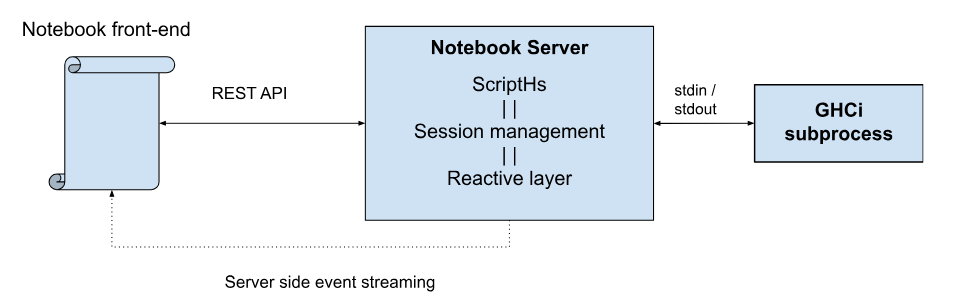
The dataflow is as follows: A user runs a command in a cell, the command is sent to the server, the server determines which cells will be affected by the code changes in the payload, evaluates the code, updates related cells, and the results are sent back via server side event (SSE) streaming.
Let’s walk through these step by step starting with the most crucial decision: how Sabela uses GHCi sessions to evaluate code.
Session module
As previously explained, Sabela uses a managed GHCi subprocess to evaluate code snippets. This has two important advantages. Firstly, we get the power, stability, and API surface of GHCI for free. Secondly, we get GHC’s package management capabilities for free (package envs, GHC environments etc). These two advantages jointly make the package easy to maintain.
The session interface
Before diving into implementation details you can simulate how Sabela works in GHCi yourself. Doing so will help you get a better intuition of the library’s design choices.
GHCi, version 9.8.4: https://www.haskell.org/ghc/  :? for help
ghci> :set prompt ""
:set prompt-cont ""
These first two commands ensure that there is no prompt for single and multi-line GHCi inputs. That way we needn’t worry about parsing out the ghci> prompt or any such visual markers.
Next we place a marker to flag where the output for what will be the next command begins.
PS C:\Users\mscha> ghci
GHCi, version 9.8.4: https://www.haskell.org/ghc/  :? for help
ghci> :set prompt ""
:set prompt-cont ""
putStrLn $ "---Marker-0---"
---Marker-0---
Now, for every command we run the command and then print the marker with an updated int value.
PS C:\Users\mscha> ghci
GHCi, version 9.8.4: https://www.haskell.org/ghc/  :? for help
ghci> :set prompt ""
:set prompt-cont ""
putStrLn $ "---Marker-0---"
---Marker-0---
5 + 5
10
putStrLn "---Marker-1---"
---Marker-1---
To retrieve the output for our previous command we go from the last marker position and read until the previous marker.
This gives us everything from the first command (5 + 5) to the marker printing (putStrLn "---Marker-1---"). So now the problem boils down to separating all the stuff we input to GHCi vs the stuff it outputs.
Luckily we can already separate stdin vs stdout. So stdout will only contain:
---Marker-0---
10
---Marker-1---
This is our entire communication model with the GHCi. This brings us to our core interface that talks to GHCi - a Session record.
data Session = Session
    { sessLock :: MVar ()
    , sessStdin :: Handle
    , sessStdout :: Handle
    , sessStderr :: Handle
    , sessProc :: ProcessHandle
    , sessLines :: Chan Text
    , sessErrBuf :: IORef [Text]
    , sessCounter :: IORef Int
    , sessConfig :: SessionConfig
    }

data SessionConfig = SessionConfig
    { scDeps :: [Text]
    , scExts :: [Text]
    , scGhcOptions :: [Text]
    , scEnvFile :: Maybe FilePath
    }
    deriving (Show, Eq)
The session record contains the structures we need to mediate this communication:
- A lock for atomicity
- Handles for stdin, stderr, and stdout
- A process handle for cleanup
- A channel that will asynchronously get GHCi output
- An error buffer where we can accumulate errors
- A counter to keep track of what the current marker generation is
- And some package/environment configuration we used to start GHCi.
What’s the trade off? Communication happens over processes that trade strings. This introduces overhead and means there is no clear contract on what sorts of error cases can arise. Concretely, evaluation goes from O(10ms) to O(100ms). This is still interactive but worth calling out.
Managing packages
Closely related to the session module is the package management functionality (which is derived from scripths). Since we are using the system GHCi process we can control what packages are visible to it by giving it custom package environments. When a package is installed we run cabal install <package> --lib –package-env=<path> then restart the GHCi session. This is the recommended way (at time of writing) of making GHCi play well with packages.
Parsing modules
The parsing/transformation is also based on scripths. It takes a block of code and has to change it into something that a GHCi subprocess can understand. The parser is extremely naive but works well for our use case. It extracts two things from each payload:
- a cabal metadata record gathered from some comment annotations, and,
- Lines of code with different instruction types: imports, GHCI directives, template haskell, and actual code.
The lines of code are then transformed to text and evaluated in a GHCi session.
Handlers module
The handler module is the coordination layer between the UI and the Haskell runtime. It automatically re-executes code blocks when inter-cell dependencies change thus ensuring that the notebook state remains consistent. Put simply when a cell is changed we need to update all its dependencies. Cell A depends on cell B if A uses anything that b defines. The handler module runs a series of steps to make this possible.
Environment setup
We first make sure that all the notebook dependencies are installed. If all the dependencies are already present in the environment we skip this step. Otherwise, we install the dependencies then restart the GHCi session.
Dependency analysis
When a cell is edited, Sabela computes the transitive closure of a cell’s dependencies. The engine performs a naive parse over the code to extract: definitions (symbols introduced via let, data, type, or top-level assignment), and usages (all identifier tokens found within the cell). This is a “greedy” lexical scan rather than a full AST parse (it captures tokens but doesn’t resolve scopes)
Change propagation
This part is the “reactive” part. It determines the minimal set of cells that must run to maintain consistency.
- Initialization: A “Dirty Set” is initialized. If a cell’s ID matches the edited cell ID, it is marked for execution, and its definitions are added to the Dirty Set.
- Iterative Intersection: For every subsequent cell, the algorithm checks if its usages intersect with the current Dirty Set.
- Accumulation: If we find an intersection, that cell is also marked for execution, and its own definitions are merged into the Dirty Set. This propagates changes such that a change in Cell A affects Cell B, which in turn affects Cell C.
We then rerun only the affected cells in topological sort order.
Observability and operability
By default we’ll log as much information as possible in the prototype. We can later put this behind debugging flags. Every time a command is run we should see: the call path, and the final payload sent to GHCi.
Future Work
Creating a standard save file format
Jupyter saves notebooks as ipynb files which contain data and metadata in the same file. This makes them hard to read/inspect outside of Jupyter. Sabela currently saves the entire notebook as a markdown file (without the outputs). In future, we should save multiple files that can be bundled together in a zip file - the markdown, the file metadata, and extra files that are packaged with the notebook.
Polyglot notebooks
This approach could be used with any REPL environment. Code cells could be different languages/runtimes that execute independently. We could even go a step further and create an IPC layer between these language runtimes to create polyglot notebooks.
Scaling to Multi-Tenancy
While the initial Sabela prototype is designed for a single-user local environment, the architecture is intentionally decoupled to allow for multi-tenant scaling. Transitioning Sabela to a multi-user service involves moving from a singleton state model to a session-orchestration model.
In a multi-tenant environment, process isolation becomes a primary concern. Haskell’s GHCi sessions and cabal installations can be resource-intensive. The Server-Sent Events (SSE) logic must be updated to ensure data privacy and correct routing.
Matching the feature richness of notebooks like Jupyter, Marimo, and Pluto.jl also means having interactive widgets that function as input variables. This path forward isn’t very clear right now and requires some designing.